
FAQ
Frequently asked questions
The questions I'm asked before we work together, with the answers I give over the phone. If yours isn't here, write to me: twenty minutes is enough, and I'll tell you frankly when the answer is no.
01Services
About the services
- "What do you do, concretely?"
- Four things. I automate repetitive tasks: emails sorted, invoices entered, reminders sent, form answers copied to the right place. I set up a custom call-answering service, so that your business phone answers and takes messages when you can't. I build second brains for businesses, a memory of your procedures and documents that an assistant consults. And I design websites whose forms talk directly to your systems.
- "What exactly does the call-answering service do?"
- You get a business number that rings on your cell phone, with the caller's number on screen. If you don't pick up, a greeting recorded in your own words takes the message. You receive it by email within the minute, transcribed, with the audio recording attached: no more voicemail to check. Outside your business hours, or while you're busy, an assistant answers the caller and, in full transparency, introduces itself as your AI assistant, describes your services and takes their contact details so you can call back, or even books an appointment on the spot. Text messages received on that number reach you by email as well. Your cell phone number, for its part, stays private.
- "What is a second brain for a business?"
- A structured memory of your business: procedures, documents, file history, which an assistant consults to answer your team, prepare a draft or flag what is out of the ordinary. It produces, you decide: nothing goes out without a person. The main work is writing down what you already know; it is also what stays with you when the assistant changes.
- "Do you also build websites?"
- Yes, when it serves your business: a clear, fast site, optimized for search engines, bilingual if you want it, whose forms feed your automations directly instead of an inbox. This site is one example; I designed, wrote and published it myself, and it can be changed in one minute.
- "Can everything be automated?"
- No, and I'll tell you. The urgent, the sensitive and the exceptional still go through a person. What automates well: the repetitive, clear task that comes back every week and calls for no judgment. What needs your head stays in your hands; the machine takes care of what surrounds it.
02Tools
About the tools
- "Which tools do you work with?"
- I start from the goal, and the technology is chosen accordingly, from proven applications only. Since most self-employed professionals work with Google or Microsoft 365, I work from that environment. The automations plug straight into it. When a task calls for reading or writing text, transcribing a message, preparing a draft, filing an email, a language model takes care of it, chosen for the task and replaceable without touching the rest. n8n, Twilio and Cloudflare are some of the applications used.
- "What is n8n?"
- A tool that connects your software together: when something happens in one, it does something in another. An email comes in, it gets filed and a draft reply is prepared. An invoice arrives, its lines are entered into your accounting system. Two things set it apart: it can run in an account in your name, hosted by its publisher or on your own server, and it lets you write custom logic when the ready-made blocks are no longer enough, which happens quickly as soon as a real case has exceptions.
- "Where does it run? Who pays for the tool?"
- In your own account, in your name. Anything that runs on a schedule or reacts to an event needs an always-on service; the subscription is yours, directly with the provider, and I do all the setup. I never host a client's system at my place: your data and your access stay with you.
- "I already have automations on Zapier or Make."
- I read them to understand the logic, then we look at the best option for your needs.
- "What if you disappear in six months?"
- Nothing here is locked to me. The system runs in your own account, with your own access; I hold nothing you would have to ask me for. You receive the complete file, the documentation and the connection guide. The tools are standard: any integrator can pick up from there. And the system warns you itself if something breaks.
03Invoicing
About invoicing
- "What must a self-employed professional's invoice contain in Quebec?"
- A date, a sequential number, your name or your business's name, the client's name, a description of what was delivered, and the taxes shown separately. Once you are registered for the GST and the QST, your registration numbers appear on it too. As long as your sales stay under the small supplier threshold, registration is optional; above it, it becomes mandatory, and it is up to you to watch for the moment you cross that threshold. Invoices must be kept for several years. The details of the rules change; the authoritative source is Revenu Québec, not this page.
- "When is it time to automate invoicing?"
- Three signs. Your invoices go out in a batch at the end of the month, when the work was delivered on the 3rd: your money is waiting on the table. You follow up from memory, sometimes too late, sometimes twice with the same client. And you retype what already exists in an email, a quote or your calendar, into the invoice, then into your tracking, then for the accountant.
- "What gets automated, and what stays with me?"
- On its own: the invoice is created as soon as the job is marked delivered, with the details already filled in from the quote or the appointment; it goes out by email, in your words; the payment reminder goes out on the due date, politely, and a second one follows if nothing moves; when the payment comes in, the file closes. Yours: deciding what gets invoiced and for how much, settling the special cases, filing your tax returns with your accountant. The system prepares; it doesn't judge.
- "Is free invoicing software enough?"
- Often, yes, to produce the invoice itself. What software doesn't do is connect to the rest: your inbox, your calendar, your quotes, your payment tracking. Automation doesn't replace your invoicing software; it links it to what surrounds it, so the information no longer has to be retyped. If you invoice a few times a month and your clients pay on time, keep the habit and the free software. I'll tell you if that's your case.
04Process
About the process
- "How does it start?"
- With twenty minutes on the phone, no commitment. You tell me where you lose time; I tell you whether it can be automated, where to start, and what it costs. If the answer is no, you'll know right away.
- "What is observation mode?"
- The system is first delivered without sending or changing anything: it runs on your real data and shows you what it would have done. You read, you correct what's wrong, you approve. Then we turn it on. Nothing goes out to a client or a supplier before you've seen it.
- "Who gets trained, and how long does it take?"
- The people who will live with the system, at the same time as the delivery: what it does, what it doesn't do, what to look at when something is out of the ordinary. For a self-employed professional, that's you, in one meeting. If you want, we go further: your team learns to maintain its automations and to build new ones.
- "How do you get paid?"
- A fixed price, given after the call and before we start, for a result described in black and white. Never a percentage, never a running meter. What doesn't work as agreed is fixed at no charge; what you want on top is the subject of a new agreement.
- "Is my data protected?"
- It stays in your tools, under your access; nothing passes through an account of mine. Every system goes through a checklist before being turned on: no password in plain text, no trigger open to everyone, explicit time limits, no sensitive data kept in the logs. The processing is built to stand up to Law 25.
- "How do you ensure maximum security?"
- In three ways. I only use recognized applications: those of Google, of Microsoft, n8n, Cloudflare, Twilio. I explain how to do the installation on your own computer, in person or by video; I never have the passwords to your installation, and everything belongs to you. And I inspect installations to make sure there is no data leak and no vulnerability; when needed, I call on a computer security expert.
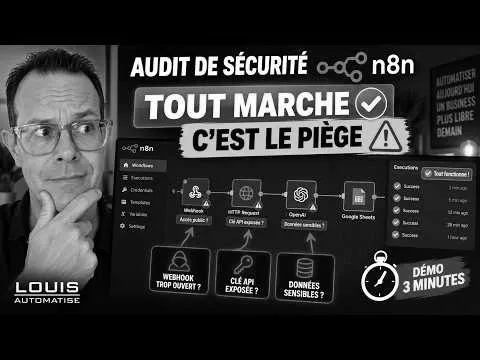
The security audit explained in three minutes. The YouTube player loads only when clicked. See the full case.
05Before we start
Your question isn't here?
Write to me. I answer in person, usually during business hours, and I'll tell you frankly whether your case is worth a project.